 Peek
PeekPeek vs CleanShot X
CleanShot X is a full studio for screenshots and screen recordings. Peek turns a screenshot into something an AI can read. Different jobs, and plenty of people keep both.
Pick CleanShot X if you
- record your screen as video or GIF
- mark up images with arrows, spotlights and backgrounds
- share captures as cloud links with your team
Pick Peek if you
- paste screens into ChatGPT, Claude, Cursor or a terminal agent
- want keys and tokens masked before anything leaves your Mac
- want your coding agent to fetch captures itself
At a glance
| Compared | Peek | CleanShot X |
|---|---|---|
| Made for | Handing a capture to an AI | Screenshots, recording, markup and sharing[2] |
| Text in the capture | Read on your Mac and sent as text with the description | Copy text from images, on device, 30+ languages[2] |
| Secrets | Finds API keys, tokens, passwords, card numbers and emails; masks and blurs them before sending | Blur and pixelate tools you apply[2] |
| Description for an AI | Four formats: chat, editor, terminal agent, anywhere | Not on their page |
| Screen recording | No | MP4, GIF, mic and computer audio[2] |
| Scrolling capture | Pro | Yes[2] |
| Annotation | Point & Talk marks with voice, Pro | Arrows, spotlight, counter, text and more[2] |
| Cloud sharing | No. Optional upload to your own server over scp, Pro | One-click links, 1 GB with Basic[3] |
| Coding agents | MCP server with 9 tools and the peek command | Not on their page |
| Price | Free plan. Pro $39 once, launch price | Basic $35 once[3] |
What CleanShot X does well
It covers far more of the screenshot job than Peek tries to. Its features page lists area, window, fullscreen, scrolling and self-timer captures, a freeze-screen mode, a full annotation toolset, backgrounds, a video editor with smart zooms, floating screenshots that stay on top, capture history, and cloud links with passwords and self-destruct. If you make images and videos for people to look at, it's built for that.[2]
What Peek adds when the screenshot is for an AI
Secrets go first
Peek finds keys, tokens, passwords, card numbers and emails on its own, before any AI sees the capture. On every plan.
Written for where you paste
Prose for chat apps, Markdown for AI editors, compact text with the git branch for terminal agents.
Agents fetch it themselves
Claude Code, Codex and Cursor read captures through MCP or
peek last. No saving and attaching.
The same capture, two ways
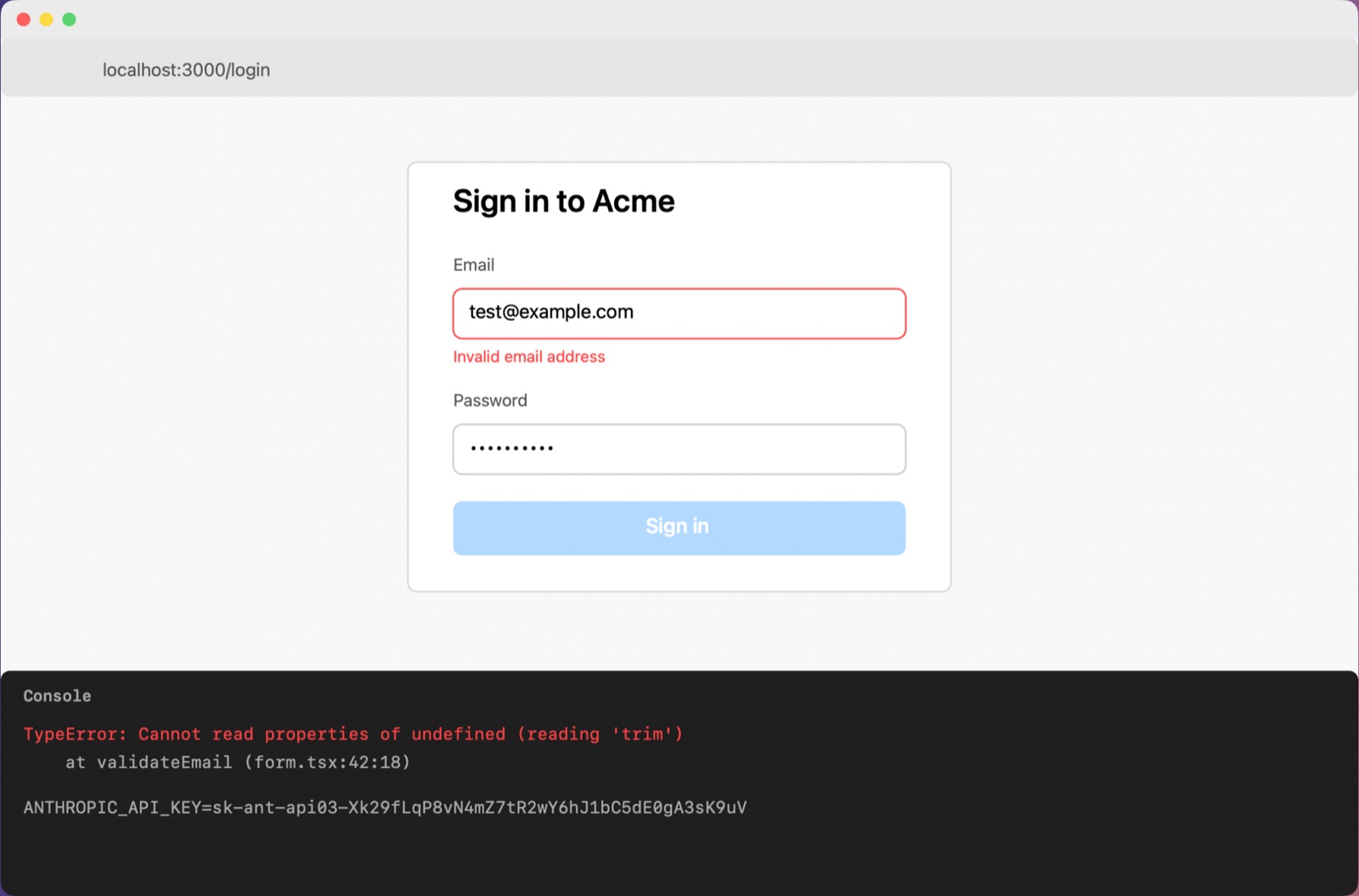
Screenshot: Acme login form with email validation error and console TypeError
Where: localhost:3000/login

A sign-in form at localhost:3000/login shows the email field outlined in red with an "Invalid email address" message, and the sign-in button is disabled. A developer console below reports a TypeError inside validateEmail.

What's on screen:
- The email field contains test@example.com and the password field is filled with masked characters.
- The Sign in button appears faded, suggesting it is disabled.
- The console line ANTHROPIC_API_KEY=[API key] is masked and was left as is.

Exact text:
"Invalid email address"
"TypeError: Cannot read properties of undefined (reading 'trim')"
"at validateEmail (form.tsx:42:18)"

What seems wrong: The validateEmail function in form.tsx throws because it calls trim on an undefined value, so the form reports the email as invalid even though a valid-looking address is entered.

Why is my email validation failing with this trim error and how do I fix it?
Peek's real output for the capture on the left. The image comes along, key blurred.
Price
| Plan | Price | What you get |
|---|---|---|
| Peek Free | $0 | Every capture mode, all secret removal, every format |
| Peek Pro | $39 once, launch price ($49 regular) | A year of updates, 3 Macs, 14-day free trial |
| CleanShot Basic | $35 once[3] | A year of updates, then $19 a year if you want more; 1 GB cloud[3] |
| CleanShot Pro | $10 per user a month, billed yearly[3] | Unlimited cloud, custom domain, SSO and SCIM[3] |
US dollars, as listed on 18 October 2026. Check cleanshot.com before you buy.
Using both
Keep CleanShot X for images and videos you share with people. Press ⌃⌘P when the screen is going to an AI. Peek uses its own shortcut, so neither gets in the other's way.
Questions
Does CleanShot X hide API keys on its own?
Its features page lists blur and pixelate tools that you apply yourself. It doesn't describe finding secrets automatically.
Does CleanShot X write descriptions for an AI?
Its features page doesn't list any AI features.
Does Peek record video?
No. Peek captures images: an area, a window, the full screen, a scrolling page or a timed series.
Where do Peek's captures go?
Only to the AI you chose, after secrets are removed. Nothing about your captures is sent to Peek's developer.
Sources
- CleanShot X features, cleanshot.com, checked 2026-10-18
- CleanShot pricing, cleanshot.com, checked 2026-10-18
Facts about Peek come from Peek's README. CleanShot X is a trademark of its owner; this page isn't affiliated with or endorsed by it.