 Peek
PeekPeek vs Xnapper
Xnapper makes tidy screenshots and can hide sensitive details in one click. Peek hides secrets too, then reads and describes the capture for an AI.
Pick Xnapper if you
- share good-looking screenshots on social or in docs
- want balanced framing and backgrounds automatically
- hide emails, cards, IP addresses or keys before sharing an image
Pick Peek if you
- paste screens into ChatGPT, Claude, Cursor or a terminal agent
- want the exact text and a description, not only an image
- want your coding agent to fetch captures itself
At a glance
| Compared | Peek | Xnapper |
|---|---|---|
| Made for | Handing a capture to an AI | Tidy, framed screenshots[10] |
| Text in the capture | Read on your Mac and sent as text with the description | Select and copy text, on device[10] |
| Secrets | Finds API keys, tokens, passwords, card numbers and emails; masks and blurs them before sending | One-click hiding of emails, card numbers, IP addresses and API keys[10] |
| Description for an AI | Four formats: chat, editor, terminal agent, anywhere | Not on their page |
| Coding agents | MCP server with 9 tools and the peek command | Not on their page |
| Price | Free plan. Pro $39 once, launch price | Free with a watermark; one payment removes it[10] |
What Xnapper does well
It makes a plain screenshot look finished. Its page lists automatic balance and background color, custom gradients or images, one-click hiding of emails, credit cards, IP addresses and API keys, and on-device text recognition.[10]
What Peek adds when the screenshot is for an AI
Secrets go first
Peek finds keys, tokens, passwords, card numbers and emails on its own, before any AI sees the capture. On every plan.
Written for where you paste
Prose for chat apps, Markdown for AI editors, compact text with the git branch for terminal agents.
Agents fetch it themselves
Claude Code, Codex and Cursor read captures through MCP or
peek last. No saving and attaching.
The same capture, two ways
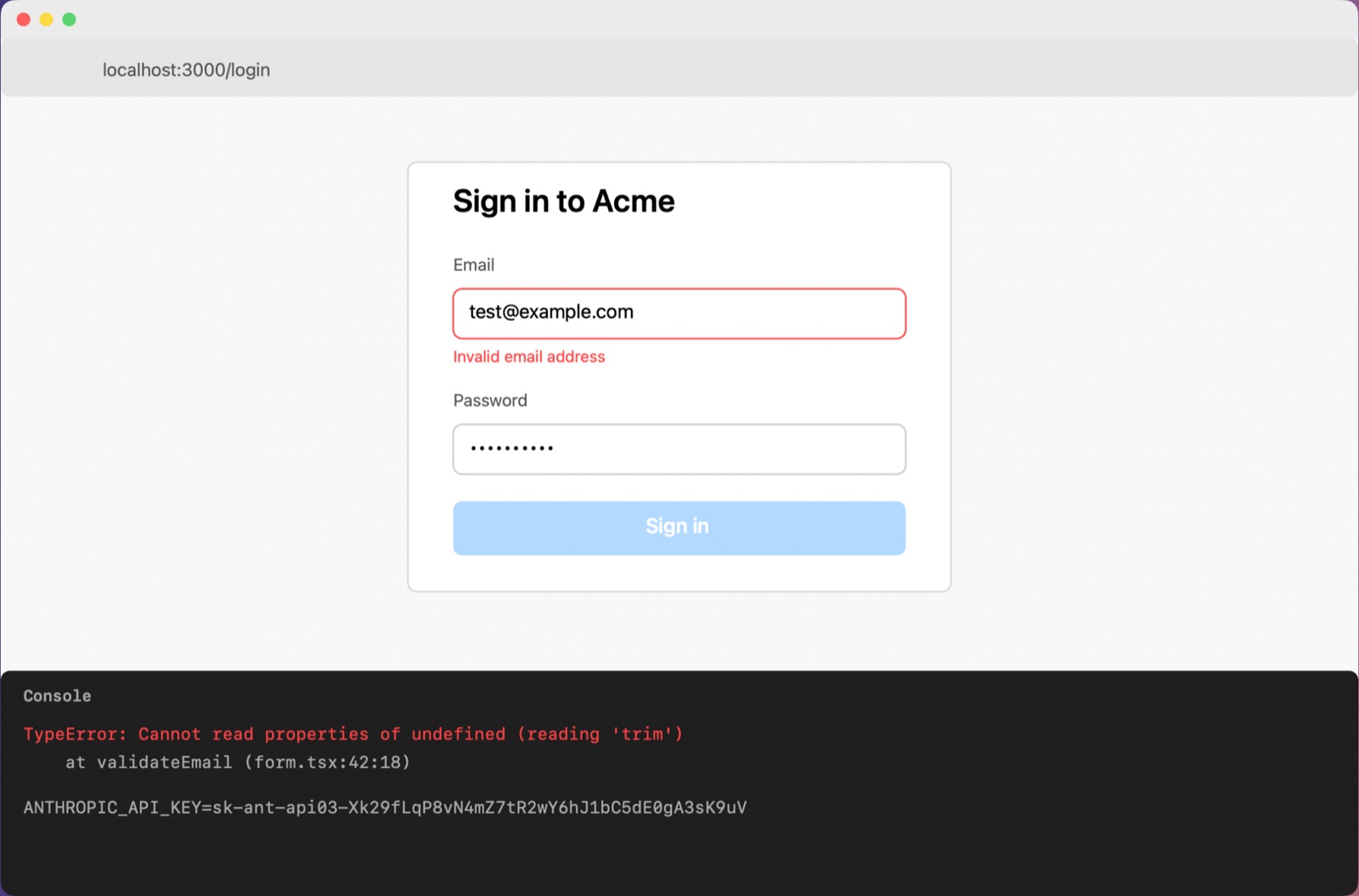
Screenshot: Acme login form with email validation error and console TypeError
Where: localhost:3000/login

A sign-in form at localhost:3000/login shows the email field outlined in red with an "Invalid email address" message, and the sign-in button is disabled. A developer console below reports a TypeError inside validateEmail.

What's on screen:
- The email field contains test@example.com and the password field is filled with masked characters.
- The Sign in button appears faded, suggesting it is disabled.
- The console line ANTHROPIC_API_KEY=[API key] is masked and was left as is.

Exact text:
"Invalid email address"
"TypeError: Cannot read properties of undefined (reading 'trim')"
"at validateEmail (form.tsx:42:18)"

What seems wrong: The validateEmail function in form.tsx throws because it calls trim on an undefined value, so the form reports the email as invalid even though a valid-looking address is entered.

Why is my email validation failing with this trim error and how do I fix it?
Peek's real output for the capture on the left. The image comes along, key blurred.
Using both
Keep Xnapper for screenshots you share with people. Press ⌃⌘P when the screen is going to an AI, and Peek reads, masks and describes it.
Questions
Do both hide API keys?
Yes. Xnapper's page lists one-click hiding of API keys. Peek finds and masks them on every capture, in the text and in the image.
Does Xnapper describe screenshots for an AI?
Its page doesn't name any AI features.
Sources
- Xnapper, xnapper.com, checked 2026-10-18
Facts about Peek come from Peek's README. Xnapper is a trademark of its owner; this page isn't affiliated with or endorsed by it.